Support our educational content for free when you purchase through links on our site. Learn more
What Age Group Is Suitable for Lego Robot Toys? 🤖 (2026 Guide)

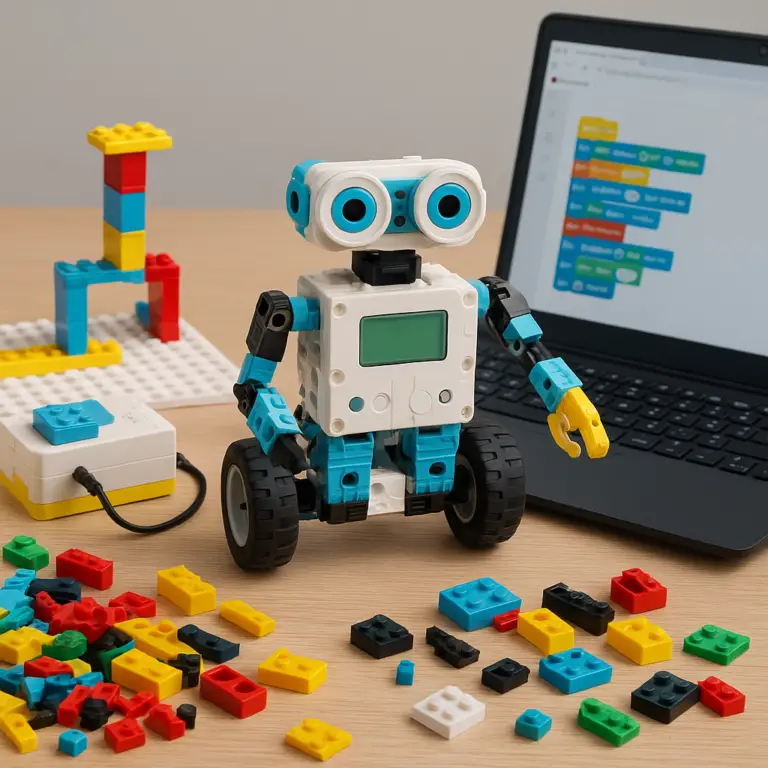
Are you wondering when your child is ready to dive into the exciting world of Lego robot toys? You’re not alone! From our adventures at Toy Brands™, we’ve seen firsthand how these clever kits can transform curious kids into budding engineers and coders. But here’s the million-dollar question: What age group truly benefits from Lego robot toys? Spoiler alert—there’s no one-size-fits-all answer. Whether your little builder is just starting out with colorful, simple bots or ready to tackle complex programming challenges, this guide breaks down the best Lego robotics kits by age, skill level, and interest.
Did you know that kids as young as 7 can start coding with Lego Boost, while teens can create fully programmable robots with Mindstorms? We’ll walk you through the cognitive benefits, safety tips, and real stories from families like ours who’ve watched their kids’ imaginations and skills skyrocket. Plus, stick around for expert advice on choosing the perfect kit tailored to your child’s unique learning style. Ready to unlock the future engineer in your home? Let’s build!
Key Takeaways
- Lego robot toys suit kids aged 7 and up, with beginner kits like LEGO Boost ideal for ages 7-12 and advanced kits like LEGO Mindstorms and SPIKE Prime designed for ages 10+.
- STEM skills grow with age and kit complexity, from basic coding and motor skills to advanced programming and robotics design.
- Parental involvement is key for younger kids to navigate apps and build confidence.
- Safety matters: small parts and electronics require supervision for children under 8.
- Choosing the right kit depends on your child’s age, interest in coding, and patience level.
Curious which Lego robot kit fits your child best? Check out our detailed breakdowns and real-life stories to make an informed choice!
Table of Contents
- ⚡️ Quick Tips and Facts About Lego Robot Toys
- 🤖 The Evolution of Lego Robot Toys: A Brief History and Age Appropriateness
- 1. What Age Groups Are Lego Robot Toys Designed For?
- 2. Cognitive and Developmental Benefits of Lego Robotics by Age
- 3. How to Choose the Right Lego Robot Kit Based on Your Child’s Skills and Interests
- 4. The Role of Coding and STEM Learning in Lego Robot Toys for Different Ages
- 5. Safety Considerations and Parental Supervision for Various Age Groups
- 6. Popular Lego Robot Toy Sets and Their Recommended Age Ranges
- 7. Tips for Parents: Encouraging Creativity and Problem-Solving Through Lego Robotics
- 8. Real Stories: How Lego Robot Toys Sparked Our Kids’ Passion for Robotics
- Conclusion
- Recommended Links for Lego Robotics Enthusiasts
- FAQ: Your Burning Questions About Lego Robot Toys Answered
- Reference Links and Resources for Further Exploration
⚡️ Quick Tips and Facts About Lego Robot Toys
Welcome to the fascinating world of robotic Lego toys, where creativity meets STEM learning! Whether you’re a parent, grandparent, or just a curious kiddo, here are some quick facts to get you started on choosing the perfect Lego robot toy for your age group:
- ✅ Recommended starting age: Most Lego robot kits are designed for kids 6 years and older, with some beginner-friendly kits suitable from age 7.
- ✅ Skill progression: Lego robotics kits grow with your child—from simple building and drag-and-drop coding to advanced programming languages.
- ✅ Popular kits: LEGO Boost (ages 7-12), LEGO Mindstorms (ages 10+), and LEGO Education SPIKE Prime (ages 10-14) are the top picks.
- ✅ STEM benefits: These toys promote critical thinking, coding skills, engineering concepts, and problem-solving.
- ❌ Not for toddlers: Small parts and complexity make these unsuitable for kids under 6 without supervision.
- ✅ Parental involvement: Younger kids benefit greatly from guided play and adult help.
- ✅ Coding platforms: Most kits use kid-friendly apps with block-based coding, easing kids into programming.
Curious how these age ranges were decided and which kit fits your child best? Keep reading—we’ll unpack all the details and share our Toy Brands™ family experiences!
🤖 The Evolution of Lego Robot Toys: A Brief History and Age Appropriateness

Lego robot toys didn’t just pop up overnight—they evolved alongside advances in technology and educational trends. Understanding this evolution helps us appreciate why certain kits suit specific age groups.
- Early days: Lego introduced programmable bricks in the late 1990s with the RCX brick, sparking interest in robotics.
- LEGO Mindstorms (1998): The first major robotics kit, aimed at older kids and teens, combining Lego building with programmable electronics.
- LEGO Boost (2017): Designed to bring robotics to younger kids (7+), with simpler coding and colorful models.
- LEGO Education SPIKE Prime (2019): Aimed at classrooms and homeschoolers, targeting ages 10-14 with a focus on STEAM learning.
Why does this matter? Because each generation of kits reflects a balance between complexity and accessibility, which directly influences the suitable age group. For example, Mindstorms requires more patience and coding skill, while Boost is a gentle introduction.
1. What Age Groups Are Lego Robot Toys Designed For?
1.1 Lego Boost: Perfect for Beginners Ages 7-12
| Aspect | Rating (1-10) | Notes |
|---|---|---|
| Design | 9 | Bright, kid-friendly, intuitive builds |
| Functionality | 8 | 5 models, simple motors & sensors |
| Coding Interface | 9 | Block-based coding app, very beginner-friendly |
| Educational Value | 9 | Great for STEM introduction |
| Fun Factor | 9 | Engaging and creative play |
Why we love Lego Boost: Our kids at Toy Brands™ started with Boost and instantly fell in love. The app guides them step-by-step, and the models (like the robot Vernie) are colorful and fun. The coding blocks are drag-and-drop, perfect for beginners.
Key Features:
- Over 840 pieces for building versatility
- Smart Hub with Bluetooth connectivity
- Color and distance sensors for interactive play
- Compatible with iOS, Android, and Fire tablets
Drawbacks:
- Limited programming depth for older kids
- Requires a compatible tablet or smartphone
Parental tip: Great for kids who are just starting to explore robotics and coding. Adult supervision helps younger kids navigate the app.
1.2 Lego Mindstorms: Advanced Robotics for Ages 10+
| Aspect | Rating (1-10) | Notes |
|---|---|---|
| Design | 8 | More complex, realistic robot builds |
| Functionality | 10 | Advanced sensors, motors, and programmable brick |
| Coding Interface | 8 | Supports block coding and Python |
| Educational Value | 10 | Deep STEM learning and problem-solving |
| Fun Factor | 8 | Challenging but rewarding |
Why Mindstorms rocks: Our older kids and teens at Toy Brands™ rave about Mindstorms. It’s like Lego meets real robotics. The EV3 or Robot Inventor bricks allow for sophisticated builds and programming.
Key Features:
- Over 500 pieces including motors and sensors
- Programmable brick with LCD screen
- Compatible with LEGO Mindstorms software and Python
- Supports complex robotics projects and competitions
Drawbacks:
- Steeper learning curve—may frustrate younger kids
- Requires patience and some coding knowledge
Parental tip: Ideal for kids who have some experience with building and coding. Great for homeschoolers and classroom settings.
1.3 Lego Education SPIKE Prime: Classroom and Homeschool Friendly for Ages 10-14
| Aspect | Rating (1-10) | Notes |
|---|---|---|
| Design | 9 | Sleek, modular design for diverse projects |
| Functionality | 9 | Multiple sensors, motors, and programmable hub |
| Coding Interface | 9 | Scratch-based and Python coding options |
| Educational Value | 10 | Focused on STEAM curriculum integration |
| Fun Factor | 8 | Encourages teamwork and creativity |
Why SPIKE Prime stands out: We love how SPIKE Prime bridges fun and education. It’s designed for classrooms but perfect for homeschoolers who want a structured STEM curriculum.
Key Features:
- 500+ pieces including sensors and motors
- Programmable Hub with color screen
- Compatible with Scratch and Python coding
- Curriculum resources available online
Drawbacks:
- More expensive than Boost
- Requires some adult guidance for younger users
Parental tip: Perfect for kids ready to dive deeper into robotics with a curriculum-based approach.
2. Cognitive and Developmental Benefits of Lego Robotics by Age
Lego robot toys aren’t just fun—they’re powerful tools for brain development. Here’s how they help at different ages:
| Age Group | Cognitive Benefits | Developmental Skills Enhanced |
|---|---|---|
| 6-8 years | Basic problem-solving, spatial awareness, sequencing | Fine motor skills, logical thinking, creativity |
| 9-12 years | Intermediate coding, engineering concepts, teamwork | Critical thinking, planning, perseverance |
| 13+ years | Advanced programming, robotics design, project management | Analytical skills, STEM career readiness, collaboration |
Our experience: At Toy Brands™, we’ve seen kids grow from building simple robots to tackling complex coding challenges. Lego robotics encourages trial and error, which builds resilience—a crucial life skill.
3. How to Choose the Right Lego Robot Kit Based on Your Child’s Skills and Interests
Choosing the perfect Lego robot toy can feel like navigating a maze. Here’s a simple step-by-step guide:
Step 1: Assess Your Child’s Age and Patience Level
- Younger kids (6-8) thrive with simple, guided kits like Lego Boost.
- Older kids (10+) can handle Mindstorms or SPIKE Prime’s complexity.
Step 2: Consider Your Child’s Interest in Coding
- If coding is new, start with block-based apps (Boost, SPIKE Prime).
- For kids eager to learn Python or advanced programming, Mindstorms is ideal.
Step 3: Evaluate Your Time for Involvement
- Younger kids benefit from parental help.
- Older kids may enjoy independent exploration.
Step 4: Think About Your Budget and Device Compatibility
- Boost requires a tablet or smartphone.
- Mindstorms and SPIKE Prime need computers for programming.
4. The Role of Coding and STEM Learning in Lego Robot Toys for Different Ages
Coding is the heartbeat of Lego robotics. Each kit introduces coding differently:
| Kit | Coding Platform | Complexity Level | STEM Focus Areas |
|---|---|---|---|
| LEGO Boost | Block-based coding app | Beginner | Basic programming, sensors, motors |
| LEGO Mindstorms | EV3 software, Python | Intermediate to advanced | Robotics, engineering, coding |
| SPIKE Prime | Scratch, Python | Intermediate | STEAM curriculum, coding, design |
Why it matters: Coding teaches kids to think logically and solve problems creatively. Our Toy Brands™ kids started with simple drag-and-drop coding and now write Python scripts to control their robots!
5. Safety Considerations and Parental Supervision for Various Age Groups
Safety first! Lego robot toys contain small parts and electronics, so keep these tips in mind:
- ❌ Not suitable for children under 3 due to choking hazards.
- ✅ Supervise kids under 8, especially when using apps and small pieces.
- ✅ Teach kids to handle electronic components gently.
- ✅ Keep devices charged and software updated to avoid glitches.
- ✅ Encourage breaks to prevent screen fatigue.
Our parents at Toy Brands™ always recommend setting up a dedicated play area to keep parts organized and safe.
6. Popular Lego Robot Toy Sets and Their Recommended Age Ranges
| Product Name | Recommended Age | Pieces | Coding Type | Key Features |
|---|---|---|---|---|
| LEGO Boost Creative Toolbox | 7-12 | 840+ | Block-based app | 5 robot models, sensors, motors |
| LEGO Mindstorms Robot Inventor | 10+ | 500+ | Block + Python | Programmable brick, advanced sensors |
| LEGO Education SPIKE Prime | 10-14 | 500+ | Scratch + Python | Curriculum support, modular design |
👉 CHECK PRICE on:
- LEGO Boost Creative Toolbox: Amazon | Walmart | LEGO Official
- LEGO Mindstorms Robot Inventor: Amazon | Walmart | LEGO Official
- LEGO Education SPIKE Prime: Amazon | LEGO Education
7. Tips for Parents: Encouraging Creativity and Problem-Solving Through Lego Robotics
Here’s what our Toy Brands™ parents swear by to maximize the fun and learning:
- Start simple: Begin with easy builds and coding exercises to build confidence.
- Encourage exploration: Let kids tinker and modify their robots beyond instructions.
- Celebrate failures: Teach that mistakes are part of learning—robots don’t always cooperate!
- Join the fun: Play alongside your kids; it’s a bonding experience and learning opportunity.
- Use online resources: LEGO’s official site and YouTube channels offer tutorials and challenges.
- Connect with communities: Join groups like Secular Homeschool Families on Facebook for support and ideas.
8. Real Stories: How Lego Robot Toys Sparked Our Kids’ Passion for Robotics
At Toy Brands™, we’ve witnessed magical moments:
- Emma, age 8, started with LEGO Boost and quickly moved on to coding her robot to dance. Her confidence soared, and she now dreams of becoming a software engineer.
- Liam, age 12, tackled LEGO Mindstorms and built a robot that could navigate mazes. His problem-solving skills improved dramatically, and he joined his school’s robotics club.
- Sophia, age 11, uses SPIKE Prime in her homeschool curriculum. She loves the teamwork and creativity it fosters, often designing her own challenges.
These stories prove that the right Lego robot toy at the right age can ignite a lifelong passion for STEM!
Ready to dive deeper into the world of Lego robotics? Check out our Educational Toys and Building Blocks and Sets categories for more inspiration!
Conclusion

After diving deep into the world of Lego robot toys, it’s clear that these kits are more than just toys—they’re gateways to creativity, STEM learning, and lifelong skills. From the beginner-friendly LEGO Boost (ages 7-12) that introduces kids to coding with colorful, interactive models, to the advanced LEGO Mindstorms (ages 10+) that challenges teens with sophisticated robotics and programming, there’s a perfect fit for every age and skill level. The LEGO Education SPIKE Prime bridges fun and curriculum-based learning, ideal for homeschoolers and classrooms alike.
Positives:
- Engaging, hands-on STEM learning that grows with your child
- Wide range of kits tailored for different ages and skill levels
- Intuitive coding platforms that start simple and advance to Python
- Encourages creativity, problem-solving, and teamwork
- Supported by extensive online resources and communities
Negatives:
- Some kits require compatible devices (tablets or computers)
- Advanced kits have a steeper learning curve, needing patience and guidance
- Small parts require supervision for younger children
Our confident recommendation: Start with LEGO Boost if your child is new to robotics and coding, especially between ages 7-12. For kids 10 and older who are ready for a challenge, LEGO Mindstorms or SPIKE Prime offer rich, rewarding experiences. With parental involvement and the right kit, Lego robot toys can spark a passion for engineering and programming that lasts a lifetime.
Remember the question we teased earlier—how do you pick the right kit for your child’s unique interests and skills? Now you have the roadmap to make an informed choice that balances fun, learning, and safety. So go ahead, build that robot, and watch your child’s imagination and skills soar! 🚀
Recommended Links for Lego Robotics Enthusiasts
-
LEGO Boost Creative Toolbox:
Amazon | Walmart | LEGO Official Website -
LEGO Mindstorms Robot Inventor:
Amazon | Walmart | LEGO Official Website -
LEGO Education SPIKE Prime:
Amazon | LEGO Education -
Recommended STEM Books for Kids:
FAQ: Your Burning Questions About Lego Robot Toys Answered

What is the ideal age range for Lego robot kits?
The ideal age range varies by kit complexity:
- LEGO Boost: Ages 7-12, perfect for beginners with simple coding and colorful models.
- LEGO Mindstorms: Ages 10+, for kids ready to tackle advanced robotics and programming.
- LEGO Education SPIKE Prime: Ages 10-14, designed for classroom and homeschool use with curriculum support.
These ranges are guidelines; consider your child’s interest, patience, and prior experience.
Are Lego robot toys appropriate for toddlers or only older children?
❌ Lego robot toys are not suitable for toddlers due to small parts and complexity. The minimum recommended age is generally 6 years, with adult supervision advised for younger children starting at 6-7. For toddlers, larger building blocks like LEGO DUPLO are safer and more age-appropriate.
How do Lego robot toys benefit different age groups?
- Younger kids (6-8 years): Develop fine motor skills, basic sequencing, and early coding concepts.
- Middle childhood (9-12 years): Enhance problem-solving, intermediate coding, and engineering understanding.
- Teens (13+): Gain advanced programming skills, robotics design, and project management experience.
These toys foster creativity, logical thinking, and perseverance across all ages.
Can teenagers enjoy building and programming Lego robot sets?
Absolutely! Teens often thrive with LEGO Mindstorms and SPIKE Prime, which offer complex builds and programming options including Python. Many teens participate in robotics competitions and clubs using these kits, making them both educational and socially engaging.
What skill levels do Lego robot toys cater to by age?
- Beginner: LEGO Boost with block-based coding and guided builds.
- Intermediate: SPIKE Prime with Scratch and Python options, curriculum integration.
- Advanced: Mindstorms with multiple programming languages and complex robotics challenges.
This tiered approach helps kids progress naturally.
Are there Lego robot sets designed specifically for younger kids?
Yes! The LEGO Boost Creative Toolbox is designed specifically for kids as young as 7, combining easy building with simple coding. It’s the perfect starter kit before moving on to more advanced robotics.
How do Lego robot toys compare to other educational toys for various ages?
Lego robot toys stand out because they combine hands-on building with coding and robotics, offering a multi-sensory STEM experience. Compared to screen-only apps or simple puzzles, Lego robotics encourages creativity, critical thinking, and real-world engineering skills. They also have strong community and curriculum support, making them a top choice for parents and educators.
Reference Links and Resources for Further Exploration
- LEGO Robots for Kids | Official LEGO® Shop US
- LEGO Boost Creative Toolbox
- LEGO Mindstorms Robot Inventor
- LEGO Education SPIKE Prime
- Secular Homeschool Families Facebook Group
- STEM Learning Resources from LEGO Education
- Amazon STEM Books Collection
For more expert insights and toy reviews, visit Toy Brands™.