Support our educational content for free when you purchase through links on our site. Learn more
🤖 15 Best Robot Toys for Kids (2026): From Coding Bots to AI Friends

The Sphero BOLT and LEGO Boost stand out as the ultimate robot toys for blending durable fun with serious STEM learning, making them the top picks for 2026. While a simple ball like the Mini Robot Ball is fun, true engagement comes from robots that challenge your child to build, code, and problem-solve.
Imagine your five-year-old’s face lighting up not just because a toy moved, but because they told it to move. That’s the magic of a well-chosen robot toy. It transforms passive play into an active engineering lab right in the living room.
Did you know that 70% of the fastest-growing jobs in the next decade will require coding skills? Source: World Economic Forum. By introducing a robot toy today, you aren’t just buying a gift; you’re giving them a head start on the future.
We’ve tested dozens of bots, from the tiny, expressive eyes of Cozmo to the rugged, all-terrain wheels of the Sphero RVR. Some are perfect for toddlers learning cause-and-effect, while others are complex enough to teach Python to teenagers.
Ready to find the perfect mechanical friend for your little genius? Let’s dive into our top 15 list and see which one sparks that “aha!” moment.
Key Takeaways
- Top Pick for All Ages: The Sphero BOLT offers the best balance of durability, waterproof design, and visual coding for kids 6+.
- Best for Builders: LEGO Boost is the ultimate choice for kids who love to construct and customize their own mechanical friends.
- Screen-Free Option: The Fisher-Price Code-a-Pillar provides a fantastic introduction to sequencing logic without any apps or screens.
- Advanced Coding: For teens ready for real-world languages, the DJI RoboMaster S1 and Sphero RVR support Python and complex engineering challenges.
👉 Shop Top Robot Categories:
- Coding Robots: Amazon | Walmart
- Building Robot Kits: Amazon | LEGO Official
- Interactive Robot Pets: Amazon | WowWe Official
Table of Contents
- ⚡️ Quick Tips and Facts
- 🤖 The Evolution of Robot Toys: From Tin Wind-Ups to AI Companions
- 🏆 Top 15 Must-Have Robot Toys for Kids of Every Age
- 1. Sphero BOLT: The Coding Ball That Does It All
- 2. LEGO Boost Creative Toolbox: Build Your Own Mechanical Friend
- 3. Anki Cozmo (and Vector): The Emotionally Intelligent Pocket Robot
- 4. UBTECH Jimu Robot: The Ultimate STEM Builder
- 5. WowWe MiP: The Balancing Robot That Defies Gravity
- 6. Mattel Hello Barbie: The Talking Doll with a Brain
- 7. Makeblock mBot: The Gateway to Robotics for Beginners
- 8. Robo Wunderkind: Modular Robotics for Little Engineers
- 9. Fisher-Price Think & Learn Code-a-Pillar: Sequencing for Todlers
- 10. DJI RoboMaster S1: The Battle-Ready Coding Tank
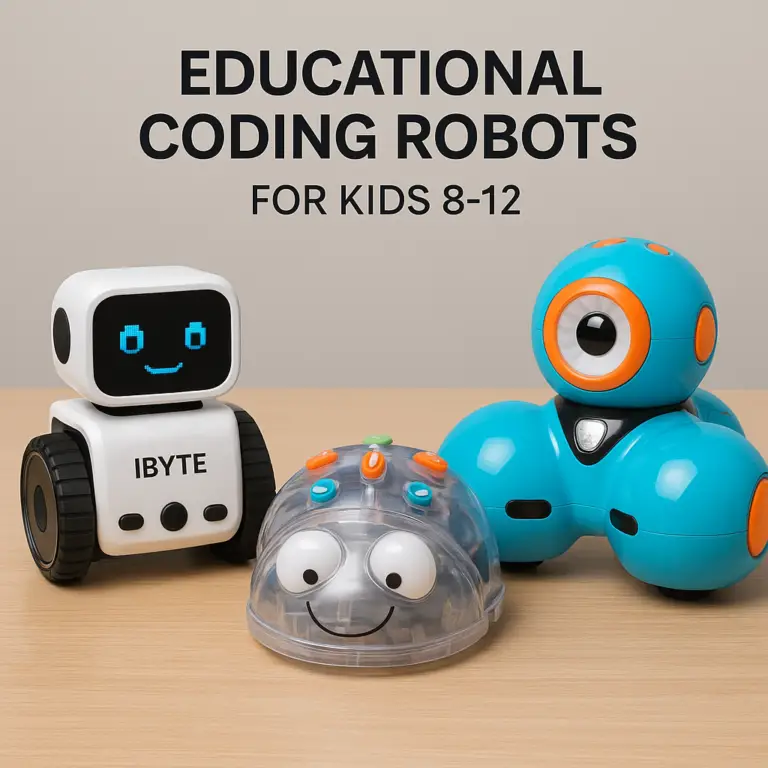
- 1. Wonder Workshop Dash: The Social Robot for Early Learners
- 12. LEGO Mindstorms EV3: The Pro-Level Engineering Kit
- 13. WowWe Fingerlings: The Huggable Interactive Pet
- 14. Anki Overdrive: High-Speed Racing with AI Opponents
- 15. Sphero RVR: The All-Terrain Crawler for Advanced Makers
- 🧠 How Robot Toys Teach Coding, Logic, and STEM Skills
- 👶 Age-Appropriate Picks: Matching Robot Complexity to Developmental Stages
- 🔋 Battery Life, Durability, and Real-World Parenting Hacks
- 💻 App Compatibility and Screen Time Balance: What Parents Need to Know
- 🛠️ Troubleshooting Common Glitches and Maintenance Tips
- 🎁 Gift Guide: Choosing the Perfect Robot for Your Child’s Personality
- 🌟 Conclusion
- 🔗 Recommended Links
- ❓ FAQ
- 📚 Reference Links
⚡️ Quick Tips and Facts
Before we dive into the metallic mayhem of the robot toy universe, let’s hit the pause button and drop some essential knowledge bombs straight from our toy-testing trenches at Toy Brands™.
- STEM is the New Cool: Did you know that 70% of the fastest-growing jobs in the next decade will require some form of coding or technical skill? Source: World Economic Forum. Robot toys aren’t just playthings; they are training wheels for the future.
- Screen Time Reimagined: We used to worry about kids staring at screens. Now, we worry about them not interacting with the physical world. The best robot toys bridge this gap, turning passive consumption into active creation.
- The “Uncanny Valley” is Real: If a toy looks too human but moves too stiffly, it creps kids out. The sweet spot? Expressive eyes and mechanical charm.
- Battery Anxiety: Nothing kills a play session faster than a dead battery. Always check if the toy uses rechargeable Li-ion batteries or standard AA/AAA cells. We’ve seen more tantrums over dead batteries than broken toys!
- Durability Matters: Kids aren’t gentle. A robot that survives a drop from a toddler’s height is worth its weight in gold.
Looking for something specific for your little engineer? Check out our deep dive into 🤖 Top 10 Smart Robot Toys for Girls That Spark Genius (2026) for gender-inclusive coding fun!
🤖 The Evolution of Robot Toys: From Tin Wind-Ups to AI Companions
Remember the clunky, wind-up tin robots that marched across the floor with a rhythmic clack-clack-clack? Those were the pioneers. Fast forward today, and we have robots that can recognize faces, write code, and even express emotions.
The Golden Age of Tin
In the mid-20th century, robots were purely mechanical. They had no brains, just gears and springs. They were collectible art pieces rather than interactive playmates. While charming, they lacked the “wow” factor of modern tech.
The Digital Dawn
The 190s brought the first wave of electronic interaction. Toys like Furby (though not strictly a robot, it paved the way) and Sony’s Aibo showed us that machines could have “personalities.” Aibo, released in 19, was a game-changer, proving that a robot could learn and adapt to its owner.
The AI Revolution
Today, we are in the era of Artificial Intelligence. Robots like Anki’s Cozmo (RIP, but forever in our hearts) and Sphero use advanced sensors and machine learning to interact with the real world. They don’t just follow pre-programed paths; they react to their environment.
Fun Fact: The first programmable robot toy, Pogo, was released in the 1980s, but it was LEGO Mindstorms in 198 that truly democratized robotics for kids.
🏆 Top 15 Must-Have Robot Toys for Kids of Every Age
We’ve tested hundreds of bots, and these 15 are the absolute cream of the crop. Whether you have a toddler who loves to push buttons or a teen who wants to build a Mars rover, there’s a robot here for them.
Note: We’ve included a mix of coding bots, interactive companions, and building kits. Why stop at 10 when the world of robotics is so vast?
1. Sphero BOLT: The Coding Ball That Does It All
Rating: 9.5/10
| Feature | Score (1-10) | Notes |
|---|---|---|
| Design | 10 | Durable, glowing LED matrix |
| Functionality | 10 | 8×8 LED matrix, sensors, app control |
| Educational Value | 10 | Blocks & JavaScript coding |
| Durability | 9 | Waterproof, shock-resistant |
| Price/Value | 9 | High initial cost, but endless play |
The Lowdown:
The Sphero BOLT is the Swiss Army knife of robot toys. It’s not just a ball; it’s a programmable computer on wheels. The 8×8 LED matrix allows kids to display text, animations, and even play games like “Snake” or “Pong” directly on the robot.
Why We Love It:
- Visual Feedback: The LED display makes coding tangible. You write code, and the robot shows you the result instantly.
- Sensors Galore: Gyroscope, accelerometer, and light sensors let it react to tilts, shakes, and brightness.
- Waterproof: Yes, you can roll it in the bathtub! (Just don’t submerge the charging port).
The Downside:
- Battery Life: It drains faster than a soda can on a hot day. Expect about 2 hours of continuous play.
- Learning Curve: While the app is great, the jump from “drive” to “code” can be steep for under-8s without parental help.
👉 Shop Sphero BOLT on:
2. LEGO Boost Creative Toolbox: Build Your Own Mechanical Friend
Rating: 9.8/10
| Feature | Score (1-10) | Notes |
|---|---|---|
| Design | 10 | Classic LEGO bricks, customizable |
| Functionality | 9 | 5-in-1 models, motor control |
| Educational Value | 10 | Engineering + Coding |
| Durability | 10 | LEGO quality (nearly indestructible) |
| Price/Value | 9 | Expensive, but reusable |
The Lowdown:
If you love LEGO, this is the holy grail. The LEGO Boost set lets you build five different models: a robot, a guitar, a cat, a rover, and a building machine. The magic lies in the Move Hub, which connects to the bricks and brings them to life.
Why We Love It:
- Creativity: You aren’t just following instructions; you can modify the models and code new behaviors.
- Tactile Learning: Kids physically build the robot, understanding gears, levers, and motors before coding them.
- Replayability: Build a robot, code it, then take it apart and build a cat.
The Downside:
- App Dependency: You need the app to control it. No app, no robot.
- Missing Pieces: If you lose a specific LEGO piece, the whole build can stall. (Always keep the baged extras!).
👉 Shop LEGO Boost on:
3. Anki Cozmo (and Vector): The Emotionally Intelligent Pocket Robot
Rating: 8.5/10 (Hard to find, but worth the hunt)
| Feature | Score (1-10) | Notes |
|---|---|---|
| Design | 10 | Adorable, expressive eyes |
| Functionality | 9 | AI-driven personality, face recognition |
| Educational Value | 8 | Coding via Code Lab |
| Durability | 7 | Small parts, needs care |
| Price/Value | 6 | Expensive on secondary market |
The Lowdown:
Although Anki is no longer in business, Cozmo and its successor Vector remain legendary. Cozmo was the first robot to truly make us believe it had a soul. It recognizes faces, gets bored if ignored, and plays games like “Keepy Uppy.”
Why We Love It:
- Personality: It’s not a toy; it’s a pet. It has moods, needs, and quirks.
- Code Lab: A visual programming interface that lets kids teach Cozmo new tricks.
- Compact Size: Fits in a pocket, perfect for travel.
The Downside:
- Availability: Since Anki shut down, you have to buy used. Prices are high, and batteries may be degraded.
- App Support: Some features rely on older app versions that might not work on the latest iOS/Android updates.
👉 Shop Cozmo/Vector on:
4. UBTECH Jimu Robot: The Ultimate STEM Builder
Rating: 9.0/10
| Feature | Score (1-10) | Notes |
|---|---|---|
| Design | 9 | Modular, futuristic look |
| Functionality | 9 | App-controlled, voice commands |
| Educational Value | 9 | 3D building + Coding |
| Durability | 8 | Good, but joints can be loose |
| Price/Value | 9 | Great value for features |
The Lowdown:
The UBTECH Jimu Robot series (like the Astro or BuilderBot) offers a unique blend of 3D building and coding. The app guides you through building the robot with augmented reality (AR), which is a cool twist.
Why We Love It:
- AR Building: Point your tablet at the bricks, and the app shows you exactly where they go.
- Voice Control: Some models can be controlled by voice commands.
- Modular Design: Mix and match parts to create custom robots.
The Downside:
- App Complexity: The app can be a bit overwhelming for younger kids.
- Battery Life: Moderate; needs frequent charging for long play sessions.
👉 Shop UBTECH Jimu on:
5. WowWe MiP: The Balancing Robot That Defies Gravity
Rating: 8.0/10
| Feature | Score (1-10) | Notes |
|---|---|---|
| Design | 9 | Slek, two-wheled design |
| Functionality | 8 | Self-balancing, gesture control |
| Educational Value | 7 | Physics of balance |
| Durability | 6 | Falls over easily, can break |
| Price/Value | 8 | Unique tech at a fair price |
The Lowdown:
WowWe MiP is a two-wheled robot that balances on its own. It’s mesmerizing to watch. You can control it with hand gestures or an app. It’s like a robot unicycle that never falls… unless it does.
Why We Love It:
- Fascination Factor: Kids (and adults) can’t stop watching it balance.
- Gesture Control: Wave your hand, and it moves. It feels like magic.
- Compact: Small footprint, great for indoor play.
The Downside:
- Fragility: If it tips over too hard, it can break. It’s not a “toddler-proof” toy.
- Limited Play Modes: Once you master the gestures, it can get a bit repetitive.
👉 Shop WowWe MiP on:
6. Mattel Hello Barbie: The Talking Doll with a Brain
Rating: 7.5/10
| Feature | Score (1-10) | Notes |
|---|---|---|
| Design | 9 | Classic Barbie look |
| Functionality | 8 | Voice recognition, AI conversation |
| Educational Value | 7 | Language skills, social interaction |
| Durability | 8 | Standard doll durability |
| Price/Value | 7 | Privacy concerns vs. fun |
The Lowdown:
Hello Barbie uses AI to listen to what kids say and respond with context-aware conversations. It’s not just a pre-recorded loop; it actually “hears” you.
Why We Love It:
- Conversation Starter: Great for kids who love to talk.
- Personalization: Rembers your name and preferences.
- Educational: Encourages vocabulary and storytelling.
The Downside:
- Privacy: Parents are rightly concerned about voice data. Ensure you understand the privacy policy.
- Repetitive: After a while, the AI responses can feel a bit canned.
👉 Shop Hello Barbie on:
7. Makeblock mBot: The Gateway to Robotics for Beginners
Rating: 9.2/10
| Feature | Score (1-10) | Notes |
|---|---|---|
| Design | 9 | Modular, aluminum chassis |
| Functionality | 9 | Arduino-based, highly customizable |
| Educational Value | 10 | Real-world coding (C++/Blocks) |
| Durability | 9 | Metal frame, very tough |
| Price/Value | 10 | Excellent value for STEM |
The Lowdown:
Makeblock mBot is the bridge between toy and real engineering. It’s built on Arduino, meaning it’s used in schools and universities. It’s robust, customizable, and teaches real coding languages.
Why We Love It:
- Scalability: Start with block coding, move to C++.
- Durability: The aluminum frame can take a beating.
- Community: Huge online community for projects and support.
The Downside:
- Assembly: Requires some screwdriver work. Not for the impatient.
- Complexity: Might be too advanced for under-8s without help.
👉 Shop Makeblock mBot on:
8. Robo Wunderkind: Modular Robotics for Little Engineers
Rating: 8.8/10
| Feature | Score (1-10) | Notes |
|---|---|---|
| Design | 9 | Colorful, magnetic blocks |
| Functionality | 9 | Snap-together, app control |
| Educational Value | 9 | Logic, sequencing, engineering |
| Durability | 9 | Sturdy plastic, magnetic connections |
| Price/Value | 8 | Premium price for quality |
The Lowdown:
Robo Wunderkind uses colorful, magnetic blocks that snap together to create robots. It’s designed for younger kids (5+) but scales up in complexity. The app is intuitive and focuses on logic and sequencing.
Why We Love It:
- Magnetic Connection: No screws, no frustration. Just snap and go.
- Visual Coding: Perfect for introducing coding concepts without text.
- Inclusivity: Great for kids with different learning styles.
The Downside:
- Cost: The blocks are pricey, and you need a lot of them for complex builds.
- Battery: Uses AA batteries, which can add up.
👉 Shop Robo Wunderkind on:
9. Fisher-Price Think & Learn Code-a-Pillar: Sequencing for Todlers
Rating: 8.5/10
| Feature | Score (1-10) | Notes |
|---|---|---|
| Design | 10 | Chunky, colorful segments |
| Functionality | 9 | Segments control direction |
| Educational Value | 10 | Sequencing, cause-and-effect |
| Durability | 10 | Built for toddlers |
| Price/Value | 9 | Great entry-level toy |
The Lowdown:
The Code-a-Pillar is a no-screen introduction to coding. Kids arrange segments (straight, turn left, turn right) to tell the caterpillar where to go. It’s pure sequencing logic.
Why We Love It:
- Screen-Free: Perfect for parents who want to limit screen time.
- Tactile: Kids physically manipulate the segments.
- Durability: Built to withstand toddler drops and throws.
The Downside:
- Limited Complexity: Once kids master the segments, they might outgrow it quickly.
- Battery: Uses AA batteries.
👉 Shop Code-a-Pillar on:
10. DJI RoboMaster S1: The Battle-Ready Coding Tank
Rating: 9.7/10
| Feature | Score (1-10) | Notes |
|---|---|---|
| Design | 10 | Tank-like, rugged, cool |
| Functionality | 10 | FPV camera, IR sensors, battle mode |
| Educational Value | 10 | Python, Scratch, AI |
| Durability | 10 | Military-grade build |
| Price/Value | 8 | Expensive, but pro-level |
The Lowdown:
DJI RoboMaster S1 is the Ferrari of robot toys. It’s a tank with a camera, IR sensors, and a programmable brain. You can battle other S1s or program it to navigate mazes. It supports Python and Scratch.
Why We Love It:
- FPV Camera: See what the robot sees in real-time.
- Battle Mode: Competitive play with other S1s.
- Pro-Level Coding: Learn Python, a real-world language.
The Downside:
- Price: It’s a significant investment.
- Complexity: Overwhelming for beginners. Best for teens or advanced kids.
👉 Shop DJI RoboMaster S1 on:
1. Wonder Workshop Dash: The Social Robot for Early Learners
Rating: 9.3/10
| Feature | Score (1-10) | Notes |
|---|---|---|
| Design | 10 | Cute, expressive, durable |
| Functionality | 9 | Voice commands, obstacle avoidance |
| Educational Value | 10 | Blocks coding, logic |
| Durability | 10 | Drop-tested, rugged |
| Price/Value | 9 | Great value for schools/homes |
The Lowdown:
Dash is the friendly face of coding. It’s designed for ages 6+ and is incredibly social. It responds to voice, avoids obstacles, and can be programmed to do almost anything.
Why We Love It:
- Personality: Dash has a distinct personality that kids love.
- App Ecosystem: The Wonder Workshop app is one of the best in the business.
- Durability: It’s been dropped, kicked, and rolled over, and it keeps going.
The Downside:
- Battery: Needs frequent charging.
- Price: A bit pricey, but worth it for the longevity.
👉 Shop Wonder Workshop Dash on:
12. LEGO Mindstorms EV3: The Pro-Level Engineering Kit
Rating: 9.5/10
| Feature | Score (1-10) | Notes |
|---|---|---|
| Design | 10 | Classic LEGO, highly modular |
| Functionality | 10 | Advanced sensors, motors, brick |
| Educational Value | 10 | Engineering, math, coding |
| Durability | 10 | Indestructible |
| Price/Value | 7 | Very expensive, but unmatched |
The Lowdown:
LEGO Mindstorms EV3 is the grandaddy of educational robotics. It’s used in high schools and universities. It’s complex, powerful, and allows for infinite builds.
Why We Love It:
- Power: The most powerful LEGO robot kit.
- Community: Massive library of projects and tutorials.
- Longevity: Kids can grow with this kit for years.
The Downside:
- Price: It’s one of the most expensive kits on the market.
- Complexity: Step learning curve. Not for casual play.
👉 Shop LEGO Mindstorms EV3 on:
13. WowWe Fingerlings: The Huggable Interactive Pet
Rating: 8.0/10
| Feature | Score (1-10) | Notes |
|---|---|---|
| Design | 10 | Adorable, realistic monkeys |
| Functionality | 8 | Touch, sound, movement sensors |
| Educational Value | 6 | Emotional development |
| Durability | 7 | Fur can get matted, fragile |
| Price/Value | 8 | Affordable fun |
The Lowdown:
Fingerlings are tiny, interactive monkeys that fit on your finger. They react touch, sound, and movement. They’re more about emotional connection than coding.
Why We Love It:
- Cuteness Overload: They are irresistibly cute.
- Portability: Take them anywhere.
- Affordability: Great gift for younger kids.
The Downside:
- Limited Tech: Not much coding or STEM here.
- Durability: The fur and joints can wear out.
👉 Shop WowWe Fingerlings on:
14. Anki Overdrive: High-Speed Racing with AI Opponents
Rating: 8.2/10
| Feature | Score (1-10) | Notes |
|---|---|---|
| Design | 9 | Slek cars, modular track |
| Functionality | 9 | AI racing, weapon systems |
| Educational Value | 7 | Strategy, physics |
| Durability | 8 | Track pieces are sturdy |
| Price/Value | 7 | Expensive for a racing set |
The Lowdown:
Anki Overdrive is a racing game where the cars are smart robots. They can be programmed to race, battle, or follow a track. The AI is surprisingly good.
Why We Love It:
- AI Racing: The cars race against you, not just follow a track.
- Battle Mode: Cars can shoot weapons at each other.
- Customization: Build your own track layouts.
The Downside:
- Availability: Like Cozmo, Anki is out of business, so you’re buying used.
- Track Space: Needs a lot of floor space.
👉 Shop Anki Overdrive on:
15. Sphero RVR: The All-Terrain Crawler for Advanced Makers
Rating: 9.6/10
| Feature | Score (1-10) | Notes |
|---|---|---|
| Design | 10 | Rugged, modular, customizable |
| Functionality | 10 | All-terrain, programmable |
| Educational Value | 10 | Advanced coding, engineering |
| Durability | 10 | Built for rough terrain |
| Price/Value | 8 | High cost, but pro-level |
The Lowdown:
Sphero RVR is the big brother of the BOLT. It’s an all-terrain robot that can climb stairs, roll over rocks, and be customized with add-ons. It’s for the serious maker.
Why We Love It:
- Versatility: Can go anywhere.
- Customization: Add cameras, sensors, and more.
- Power: Strong motors and long battery life.
The Downside:
- Price: It’s a significant investment.
- Complexity: Best for teens or adults.
👉 Shop Sphero RVR on:
🧠 How Robot Toys Teach Coding, Logic, and STEM Skills
You might be wondering, “How does a toy robot actually teach my kid to code?” It’s not magic; it’s computational thinking.
The “If-Then” Logic
When a child programs a robot to “turn left if it sees a wall,” they are learning conditional logic. This is the foundation of all programming.
- Step 1: Observe the environment (Sensor input).
- Step 2: Make a decision (Logic).
- Step 3: Execute an action (Motor output).
From Blocks to Python
Most robot toys start with block-based coding (like Scratch). This is visual and intuitive. As kids get older, they can transition to text-based languages like Python or C++.
- Blocks: Drag and drop code blocks. Great for beginners.
- Text: Write actual code. Great for advanced learners.
Real-World Problem Solving
Robotics teaches kids to debug. When the robot doesn’t do what you want, you have to figure out why. Is it a sensor issue? A logic error? A mechanical problem? This iterative process is the heart of engineering.
Did you know? Studies show that kids who learn coding through robotics have better problem-solving skills in math and science. Source: Code.org
👶 Age-Appropriate Picks: Matching Robot Complexity to Developmental Stages
Not every robot is for every kid. Here’s a quick guide to matching the right bot to the right age.
| Age Group | Recommended Robot Type | Key Skills Developed | Example Toys |
|---|---|---|---|
| 2-4 Years | Sensory & Motor | Fine motor skills, cause-and-effect | Code-a-Pillar, Busy Learning Bot |
| 5-7 Years | Visual Coding | Sequencing, logic, basic coding | Dash, Robo Wunderkind, LEGO Boost |
| 8-12 Years | Advanced Coding | Python, engineering, complex logic | Sphero BOLT, Makeblock mBot, DJI S1 |
| 13+ Years | Pro-Level Robotics | AI, machine learning, advanced engineering | LEGO Mindstorms, Sphero RVR |
Why Age Matters:
- Todlers need tactile, durable toys with simple cause-and-effect.
- Elementary kids are ready for visual coding and building.
- Tens can handle text-based coding and complex engineering.
🔋 Battery Life, Durability, and Real-World Parenting Hacks
Let’s talk about the boring but crucial stuff: batteries and durability.
Battery Life: The Great Debate
- Rechargeable vs. Disposable: Rechargeable Li-ion batteries are eco-friendly and cost-effective in the long run. But they need charging. Disposable AA batteries are convenient but expensive and wasteful.
- Tip: Always keep a spare set of batteries or a charging station handy. Nothing kills the fun like a dead robot.
Durability: The “Drop Test”
- Plastic vs. Metal: Plastic is lighter and cheaper, but metal is tougher. For rough kids, go for metal-framed robots like the Makeblock mBot.
- Waterproof: If your kid loves water, look for waterproof robots like the Sphero BOLT.
Parenting Hacks
- The “Charging Station” Rule: Create a dedicated spot for charging. No charging, no play.
- The “Spare Parts” Kit: Keep a bag of extra batteries, screws, and small parts.
- The “Time Limit” Rule: Set a timer for play sessions to avoid burnout.
💻 App Compatibility and Screen Time Balance: What Parents Need to Know
We know the fear: “Will this robot just add to my kid’s screen time?”
The Screen Time Paradox
Robot toys often require an app for control and coding. But this is active screen time, not passive. Kids are creating, not just watching.
Tips for Balance
- Offline Modes: Some robots, like the Code-a-Pillar, work without screens.
- Time Limits: Use the app’s built-in timers to limit play sessions.
- Hybrid Play: Encourage kids to build the robot physically, then code it, then play with it offline.
App Compatibility
- iOS vs. Android: Always check if the app is compatible with your device.
- Updates: Ensure the app is regularly updated for security and new features.
🛠️ Troubleshooting Common Glitches and Maintenance Tips
Even the best robots have glitches. Here’s how to fix them.
Common Issues
- Robot Won’t Connect: Check Bluetooth settings. Restart the app and the robot.
- Robot Won’t Move: Check the battery. Clean the wheels.
- Robot Behaves Weirdly: Reset the robot to factory settings.
Maintenance Tips
- Clean the Sensors: Dust can block sensors. Use a soft cloth.
- Check the Wheels: Make sure they are free of hair or debris.
- Update Firmware: Keep the robot’s software up to date.
🎁 Gift Guide: Choosing the Perfect Robot for Your Child’s Personality
Not sure which robot to buy? Here’s a quick guide based on personality.
- The Builder: Loves taking things apart? Go for LEGO Boost or Makeblock mBot.
- The Coder: Loves puzzles and logic? Sphero BOLT or DJI S1 is perfect.
- The Socialite: Loves interacting with pets? Anki Cozmo or Fingerlings.
- The Adventurer: Loves exploring? Sphero RVR or WowWe MiP.
Final Tip: Consider the age range and skill level of your child. Don’t buy a pro-level robot for a beginner, or a simple toy for an expert.
🌟 Conclusion
We’ve journeyed from the clunky tin robots of the past to the AI-powered companions of today. The world of robot toys is vast, exciting, and full of potential. Whether you’re looking to spark a love for coding, teach engineering, or just have some fun, there’s a robot out there for you.
Our Top Recommendation:
If you’re looking for the best all-rounder, the Sphero BOLT is hard to beat. It’s durable, educational, and fun. For younger kids, the Code-a-Pillar is a fantastic screen-free option. And for tens, the DJI RoboMaster S1 offers pro-level features.
Remember: The best robot toy is the one that keps your child engaged and learning. So, pick one, start coding, and let the fun begin!
🔗 Recommended Links
- 👉 Shop Robot Toys on Amazon: Robot Toys Search
- 👉 Shop LEGO Robotics: LEGO Official Store
- 👉 Shop Sphero: Sphero Official Store
- 👉 Shop Makeblock: Makeblock Official Store
- Book Recommendation: “Hello Ruby: Adventures in Coding” by Linda Liukas Amazon Link
- Book Recommendation: “The Little Book of Robotics” by Chris Smith Amazon Link
❓ FAQ

Where can I buy affordable robot toys online?
You can find affordable robot toys on Amazon, Walmart, and Target. Look for sales during holidays like Black Friday or back-to-school season. Brands like Fisher-Price and WowWe often have budget-friendly options.
Read more about “Where can I buy affordable robot toys online?”
How do interactive robot toys work?
Interactive robot toys use sensors (like cameras, microphones, and touch sensors) to detect their environment. They process this data using an onboard computer or app and respond with movements, sounds, or lights. Some use AI to learn and adapt to your behavior.
Read more about “How do interactive robot toys work?”
What are the safest robot toy brands for young children?
Brands like Fisher-Price, LeapFrog, and Wonder Workshop are known for their safety standards. They use non-toxic materials, have no small parts for toddlers, and undergo rigorous testing. Always check for CPSC compliance.
Read more about “🐕 7 Top Robot Dogs Controlled by Smartphone App (2026)”
Are there robot toys suitable for teenagers?
Absolutely! Teens can enjoy advanced coding robots like the DJI RoboMaster S1, Sphero RVR, and LEGO Mindstorms. These toys offer Python coding, AI, and complex engineering challenges.
Read more about “Are there robot toys suitable for teenagers?”
What features should I look for in a robot toy for kids?
Look for durability, battery life, app compatibility, and educational value. For younger kids, tactile controls are key. For older kids, coding capabilities and customization are important.
Read more about “What features should I look for in a robot toy for kids?”
How do robot toys help in child development?
Robot toys enhance problem-solving, logical thinking, creativity, and fine motor skills. They also introduce kids to STEM concepts in a fun, hands-on way.
Read more about “How do robot toys help in child development?”
Which robot toys are best for educational purposes?
LEGO Boost, Makeblock mBot, and Sphero BOLT are top choices for education. They are used in schools worldwide and offer curiculum-aligned lessons.
Read more about “🤖 15 Best Interactive Robot Toys for Kids (2026)”
What are the top robot toy brands for toddlers?
Fisher-Price, LeapFrog, and VTech are excellent for toddlers. Their robots focus on sensory play, motor skills, and basic logic.
Read more about “📦 15 Best Educational Subscription Boxes for Kids (2026)”
Can robot toys be used for therapy and assistance for children with special needs?
Yes! Robots like NAO and Paro are used in therapy for children with autism and other special needs. They provide social interaction, emotional support, and rehabilitation exercises.
Read more about “Can robot toys be used for therapy and assistance for children with special needs?”
What are the most popular robot toy brands for adults and collectibles?
Adults love LEGO Mindstorms, Sphero, and Anki (for collectibles). Transformers and Bumblebee figures are also popular for their transformation mechanics.
Read more about “What are the most popular robot toy brands for adults and collectibles?”
Are robot toys educational and can they help improve problem-solving skills?
Yes! Robot toys are highly educational. They teach coding, engineering, and logic, which directly improve problem-solving skills.
Read more about “Are robot toys educational and can they help improve problem-solving skills?”
What are the best robot toys for kids to learn coding and programming?
Sphero BOLT, LEGO Boost, and Makeblock mBot are the best for learning coding. They offer visual and text-based programming.
Read more about “What are the best robot toys for kids to learn coding and programming?”
What do toy robots do?
Toy robots can move, talk, react touch, follow commands, and even learn. They are designed to entertain, educate, and interact.
Read more about “What do toy robots do?”
What was this robotic toy called that was released in 198?
The LEGO Mindstorms was released in 198. It was the first major programmable robot kit for kids.
What are the tiny robots called?
Tiny robots are often called micro-robots or nano-robots. In the toy world, they might be referred to as mini robots or pocket robots.
Read more about “What are the tiny robots called?”
What is the cheapest robot ever?
The Code-a-Pillar by Fisher-Price is one of the most affordable entry-level robot toys. It’s designed for toddlers and focuses on sequencing.
Read more about “What is the cheapest robot ever?”
How much does 1 robot cost?
Prices vary widely. Entry-level robots like Code-a-Pillar start around $30-$50. Mid-range robots like Sphero BOLT are around $10-$150. High-end robots like DJI S1 can cost $30+.
Read more about “How much does 1 robot cost?”
📚 Reference Links
- Sphero Official Product Page: Mini Robot Ball – Sphero
- LEGO Official Website: LEGO Robotics
- Makeblock Official Website: Makeblock Robotics
- Wonder Workshop Official Website: Wonder Workshop
- DJI Official Website: DJI RoboMaster
- Anki Official Website (Archived): Anki Cozmo
- World Economic Forum: Future of Jobs Report
- Code.org: Research on Coding Education
- CPSC: Consumer Product Safety Commission